Control the network
Block, mock, and modify network requests so tests stay fast and deterministic.
Real backends can be slow, flaky, and stateful — three things you don't want in a test. Playwright lets you sit between the browser and the network and decide what every request does.
Four levels of control, from least to most invasive:
- Observe — log every request/response or wait for a specific one.
- Mock — answer a request from your test instead of the server.
- Modify — let the request reach the server, then patch the response (or the request).
- Block — abort whole categories of requests (images, analytics, ads).
Observe traffic
Every request and response is an event you can subscribe to.
page.on("request", (request) =>
  console.log(">>", request.method(), request.url()),
);
page.on("response", (response) =>
  console.log("<<", response.status(), response.url()),
);

await page.goto("/");
request carries the URL, method, headers, post data, and resourceType() ('document', 'image', 'fetch', …). response carries status, headers, and the body.
Wait for a specific response
When the next assertion needs a network call to settle first, use page.waitForResponse() — pass a glob, regex, or predicate.
const responsePromise = page.waitForResponse("**/api/news/");
await page.goto("/");
const response = await responsePromise;
While it's possible to wait for requests, prefer asserting on the visible UI
over waiting on a network call. Reach for waitForResponse only when no DOM
signal is available.
Mock APIs with route.fulfill
page.route() installs a handler for matching URLs. Inside the handler you decide what happens. The simplest move is route.fulfill() — answer the request without ever hitting the server.
await page.route("**/api/products/", (route) =>
  route.fulfill({
    status: 200,
    contentType: "application/json",
    body: JSON.stringify([{ name: "A different product" }]),
  }),
);
await page.goto("/");
URL patterns use glob syntax: * matches a path segment, ** matches across slashes, and common RegEx operations can be matched, too!
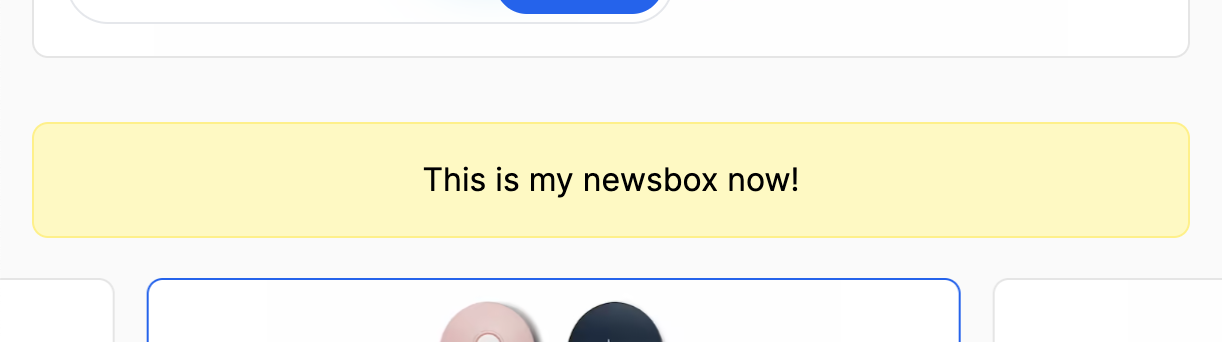
Mock the news box
The yellow newsbox on the home page renders some API content.
- Use
page.route()+route.fulfill()to return your own message. - Assert the newsbox (
data-testid="newsbox") shows your custom message.
▸ Show solution
test("mock the news box", async ({ page }) => {
  await page.route("**/api/news/", (route) =>
    route.fulfill({
      status: 200,
      contentType: "application/json",
      body: JSON.stringify({ message: "🚨 Test news!" }),
    }),
  );
  await page.goto("/");

  await expect(page.getByTestId("newsbox")).toContainText("🚨 Test news!");
});
Network handlers must be registered before the request fires. Put
page.route() calls before page.goto(), or hoist them into a beforeEach
hook or a custom fixture so they apply to every test.
Modify a real response
Mocks drift. The server returns one shape, your test believes another, and the test passes against fiction. The middle ground is to let the request reach the server and patch only the bits you care about — call route.fetch() to perform the real request, then route.fulfill({ response, ... }) to send a modified version downstream.
await page.route("**/api/products/", async (route) => {
  const response = await route.fetch();
  const products = await response.json();

  // mark the first product as out of stock
  products[0].availableForSale = false;

  await route.fulfill({ response, json: products });
});
Passing the original response keeps headers, status, and any fields you didn't touch — only the body is replaced. Use this when you want realistic data with a small twist: an empty list, a flag flipped, an error injected.
You can override individual pieces, too — route.fulfill({ response, status: 500 }) keeps the body but replaces the status. Handy for testing how the UI handles a server error without writing a fake payload.
Modify outgoing requests
The mirror of route.fulfill is route.continue() — let the request through, optionally with overrides for url, method, headers, or postData.
// add a header to every API call before it leaves the browser
await page.route("**/api/**", (route) =>
  route.continue({
    headers: { ...route.request().headers(), "x-test": "playwright" },
  }),
);
Reach for continue when the change belongs on the request, not the response — auth tokens, feature-flag headers, swapping a hostname.
Block requests to speed tests up
Some tests don't need analytics, fonts, or hero images. Drop them with route.abort().
await page.route("**/*.{png,jpg,jpeg,webp,svg}", (route) => route.abort());
await page.goto("/");
For finer control, branch on route.request().resourceType():
await page.route("**/*", (route) => {
  const type = route.request().resourceType();
  if (type === "image" || type === "media" || type === "font") {
    return route.abort();
  }
  return route.continue();
});
Aborting third-party scripts (analytics, A/B testing, chat widgets) often cuts page load time in half on busy sites.
Block the tracking script
Every page on this site loads /dummy-tracker.js, which logs
"Watch out! I'm tracking you!" to the console.

Not great!
- Block any request whose URL ends in
/dummy-tracker.js. - Subscribe to
page.on("console")and assert the tracking message never appears.
▸ Show solution
test("block the tracking script", async ({ page }) => {
  const messages: string[] = [];
  page.on("console", (msg) => messages.push(msg.text()));

  await page.route("**/dummy-tracker.js", (route) => route.abort());
  await page.goto("/");

  expect(messages).not.toContain("Watch out! I'm tracking you!");
});
Where should route handlers live?
Three options, in order of scope:
- In the test — for one-off mocks specific to a single scenario.
- In
beforeEach— shared by every test in the file. - In a custom fixture — shared across files. Register the route in the fixture's setup; Playwright tears it down with the page.
Pick the smallest scope that does the job. A test-local mock is easier to reason about than a global one that surprises you three files away.
Practice controlling the network
Pretend you're shopping from somewhere new
- The country pill in the navbar (
data-testid="geo-location") reads from/api/geo/. - Mock the endpoint to return a country code of your choice (
"JP","BR","DE"). - Assert the pill shows the matching country code.
Inject an error into a real response
- Use
route.fetch()+route.fulfill({ response, status: 500 })against/api/news/to keep the real body but flip the status. - Navigate to
/and assert the newsbox falls back to"📭 No news today — check back later.".
Block images by resource type
- Write a test that aborts every request where
route.request().resourceType() === "image". - Navigate to
/search/and confirm product names and prices still render — only the images are gone. - Compare the test's runtime with and without the block.